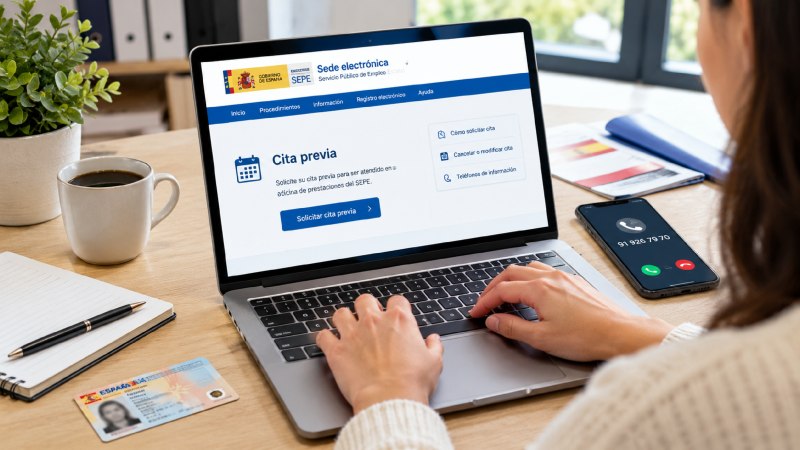
The SEPE appointment system gives you a day, time, and office where you can receive assistance in person (or by phone) from the State Public Employment Service. You need it if you want to apply for unemployment benefits, a subsidy, or resolve an issue with your benefits. On this page, you will find the ways to request an appointment, the phone numbers, and how to cancel it if you cannot attend.
Who Needs a SEPE Appointment?
You need a cita previa sepe for almost any in-person procedure at a SEPE benefits office. Walk-in service is no longer available on a first-come, first-served basis.
Appointments are required for:
- Applying for contributory unemployment benefits (unemployment benefits).
- Applying for unemployment assistance.
- Changing personal or bank details related to your benefits.
- Resolving payment issues or submitting complaints.
- Requesting a lump-sum payment (capitalization of unemployment benefits).
- Submitting the annual income declaration if you receive a subsidy that requires it.
Before going, check one important detail: to receive unemployment benefits, you must be registered as a job seeker with the employment service in your autonomous community (SAE, SOC, LABORA, Lanbide, etc.). If you have changed your address or were not registered, do this first. This regional service does not use the SEPE appointment system.
Note: Many procedures do not require an appointment. You can apply for benefits, check your application status, change your bank account, or download certificates online using Cl@ve, an electronic ID card, or a digital certificate.
How to Book a SEPE Appointment
There are three ways: online, by phone, and through a pre-application form. The website is the fastest option and shows the most available time slots.
How to Book a SEPE Appointment Online
You do not need a digital certificate to book an appointment. Follow these steps:
- Visit sede.sepe.gob.es and open “Appointment Booking” under Unemployment Protection.
- Enter your home postal code. The system will assign you an office based on it.
- Select the procedure and, if available, the sub-procedure.
- Enter your DNI or NIE and click “Continue.” If your DNI has fewer digits, add zeros at the beginning.
- Choose the office, appointment type (in person or by phone, depending on your city), date, and time.
- Enter your first name, surname, mobile number, and email address. Accept the privacy policy, complete the captcha, and click “Finish.”
- Enter the SMS code sent to your mobile phone to confirm the appointment. If you do not enter it on time, the appointment may be canceled.
- Save the confirmation receipt as a PDF and note down the reference number from the SMS.
Why it matters: Without the reference number, you will not be able to modify or cancel the appointment later. Take a screenshot just in case.
If your deadline for applying for benefits is approaching, do not wait for an available appointment. You can submit your application online and use the appointment for questions.
How to Book a SEPE Appointment by Phone
Call 91 926 79 70, the appointment number cited by the most recent guides. It is an automated system, and several sources indicate that it operates 24 hours a day.
- Select the reason for your call.
- Say or enter your DNI or NIE.
- Provide your postal code.
- Choose from the offices and time slots offered.
- You will receive an SMS with the confirmation and reference number.
Be careful with other numbers: 060 is the general SEPE information telephone number (personal assistance from Monday to Friday, 9:00 a.m. to 2:00 p.m., and an automated system available 24 hours a day). If you are looking for a toll-free number, keep in mind that calls to 060 may incur charges depending on your telephone plan. SEPE warns that numbers beginning with 800 or 807 do not belong to it. The former number 900 81 24 00 no longer works.
Note: The appointment number may change over time and depending on the region. Confirm it on the official website before calling. I could not verify it directly on the SEPE website, which only links to its “Telephone Assistance” page.
How to Book an Appointment Without a Digital Certificate or Electronic ID
Use the pre-application and procedures form on the official website. You can start the procedure without an electronic signature, and a SEPE officer will contact you afterward. You need to provide your name, identity document, bank account, telephone number, and email address.
This option works best if you do not have Cl@ve or a digital certificate and are having difficulty finding an available appointment.
How to Book a SEPE Appointment in Your Province
The process is the same throughout Spain. The office assigned to you based on your postal code is what changes.
| City or Area | What You Should Know |
| Madrid | There are many offices. Enter your exact postal code so the system can assign the nearest one. |
| Barcelona, Girona, and Lleida | Job-seeker registration is handled by Catalonia’s employment service (SOC). SEPE manages benefits. |
| Valencia, Alicante, and Elche | Registration is handled by LABORA. SEPE appointments are for benefits. |
| Seville | Registration is handled by Andalusia’s SAE. |
| Zaragoza | Book through the same electronic office using your postal code. |
| Mallorca, Tenerife, Las Palmas, and the Canary Islands | Offices are organized by island. Choose the office assigned by the system and check the telephone appointment option. |
| Murcia, Asturias, Pamplona, Valladolid, Logroño, A Coruña, and Badajoz | The same procedure applies. Your postal code determines the office, and available slots change daily. |
Tip: If your office has no available appointments, try the telephone option or a nearby postal code that corresponds to your actual residence. Do not use a postal code that does not belong to you.
How to Cancel or Change a SEPE Appointment
Cancel as soon as possible to free up your slot and allow yourself to book another appointment.
- Visit the SEPE website and click “Start Application / Cancel Appointment.”
- Enter your DNI or NIE and the reference number received by SMS.
- Choose to cancel or modify the appointment and confirm.
If you booked the appointment by phone, you can call the appointment number again. Some guides state that cancellation is only possible online, so use the website if the phone system does not allow you to cancel.
Warning: Failing to attend a mandatory appointment may affect your benefits. Always notify SEPE if you cannot attend.
What Documents Should You Bring to Your SEPE Appointment?
Bring paper copies and digital copies on your mobile phone of the following:
- Valid DNI or NIE.
- Appointment confirmation (PDF, SMS, or printed copy).
- Proof of registration as a job seeker.
- Employer certificate (your employer usually sends it directly).
- IBAN of the bank account where you will receive payments.
- Any documents specific to your case.
Note: If your procedure involves the annual income declaration, also bring proof of income for your household.
Tips for Getting a SEPE Appointment
- Finding an available slot can be difficult, and the OCU has reported appointment-system congestion at some offices.
- Try different times. Slots become available when other people cancel their appointments. Check early in the morning and late in the afternoon.
- Change the appointment type. If no in-person appointments are available, check for telephone appointments. They often have greater availability.
- Use the automated telephone system. With fewer calls, the system may work more smoothly outside peak hours. The most useful trick is to keep trying at different times.
- Check your postal code. An error may assign you to another office.
- Check your mobile phone. Without the verification SMS, the appointment will not be confirmed.
- Avoid fake websites. Book only through sede.sepe.gob.es and never pay for an appointment, as it is free.
- Ask about courses. Use your appointment to inquire about free training opportunities.
Comparison Table: Which Option Is Best for You?
| Method | Where | Speed | Convenience | Notes |
| Online | sede.sepe.gob.es | Immediate | High | No digital certificate needed to book |
| Phone | 91 926 79 70 | A few minutes | Medium | Automated system, suitable for people without internet access |
| Pre-application | Form on the website | An officer contacts you | Medium | No electronic identification required |
| 060 | Telephone | Varies | Medium | General information; charges may apply |
The most recommended option is online booking because you can see all available slots at once, save the confirmation immediately, and manage cancellations yourself.
Frequently Asked Questions
What Is a SEPE Appointment?
It is the booking system for receiving assistance at an office of the State Public Employment Service. It assigns you an office, date, and time and is used for procedures such as applying for unemployment benefits or correcting your benefit details.
What Is the SEPE Appointment Phone Number?
The most recent guides list 91 926 79 70, an automated system. The number 060 is the general information line. Check the number on the SEPE website before calling.
Is a SEPE Appointment Free?
Yes, booking an appointment is free. Be careful of websites that charge you to make a reservation. Calls to 060 may incur charges depending on your telephone plan.
Can You Visit SEPE Without an Appointment?
Generally, no. If your matter is urgent, submit your application online or contact 060 for information.
How Do You Book a SEPE Appointment Online?
Visit sede.sepe.gob.es, open “Appointment Booking,” enter your postal code and DNI or NIE, select a date and time, and confirm using the SMS code. Save the confirmation receipt.
How Do You Cancel a SEPE Appointment?
Click “Cancel Appointment” on the SEPE website and enter your DNI or NIE and the SMS reference number. You can also try canceling by calling the appointment number.
What Should I Do If No SEPE Appointments Are Available?
Check at different times, try the telephone option, or use the pre-application form. If you have a deadline, submit your application online.
Do I Need a Digital Certificate to Book an Appointment?
No. You only need your DNI or NIE, postal code, mobile number, and email address. A digital certificate, Cl@ve, or electronic ID can be used to complete procedures online without an appointment.
Can I Book an Appointment for Someone Else?
You can make a booking using another person’s details, but that person or their authorized representative must attend. The SMS will arrive on the mobile number you provide, so make sure it is correct.
Can I Use the Appointment to Renew My Unemployment Registration?
No. Renewing your job-seeker registration is handled by the employment service in your autonomous community, usually online.
What Happens If I Miss My SEPE Appointment?
There is usually no penalty for missing an appointment, but you may be unable to book another one until the appointment date has passed. For mandatory procedures, missing it may affect your benefits, so cancel in advance.
Conclusion
My recommendation is to book your appointment online: it is free, fast, and gives you a reference number for making changes. Use the telephone if you cannot access the website, and use the pre-application form if you do not have electronic identification. Keep the SMS and confirmation receipt, and have your documents ready. If any information has changed, confirm it on sede.sepe.gob.es.